For freelancers & small businesses

Accounting software
you actually own.

One payment. No subscription. Your data stays on your computer — always.

7-day free trial Mac + Windows Multi-user LAN mode No internet required

CoreBooks is in public beta. Bugs happen — we ship fixes fast and every update through v1.0 is free. Try it free for 7 days — no credit card needed.

QuickBooks Simple Start

$38
per month
$456 / year
every year, forever
$2,280 over 5 years
CoreBooks

$249
one-time payment. no annual fee. ever.

Pricing based on QuickBooks Simple Start at $38/mo as of 2026. CoreBooks is not affiliated with or endorsed by Intuit Inc.

01 — QuickBooks Migration

Switch from QuickBooks Online or Desktop.

Whether you're on QuickBooks Online or Desktop, CoreBooks brings your data with you. QBO imports in one click via OAuth. Desktop users follow a guided 4-step CSV wizard. Either way, your accounts, invoices, bills, and transactions come along.

  • QuickBooks Online: one-click OAuth import, 1:1 balance sheet match
  • QuickBooks Desktop: guided CSV export wizard with step-by-step instructions
  • Accounts, customers, vendors, invoices, bills, and journal entries
  • White glove migration service available for hands-off transfer
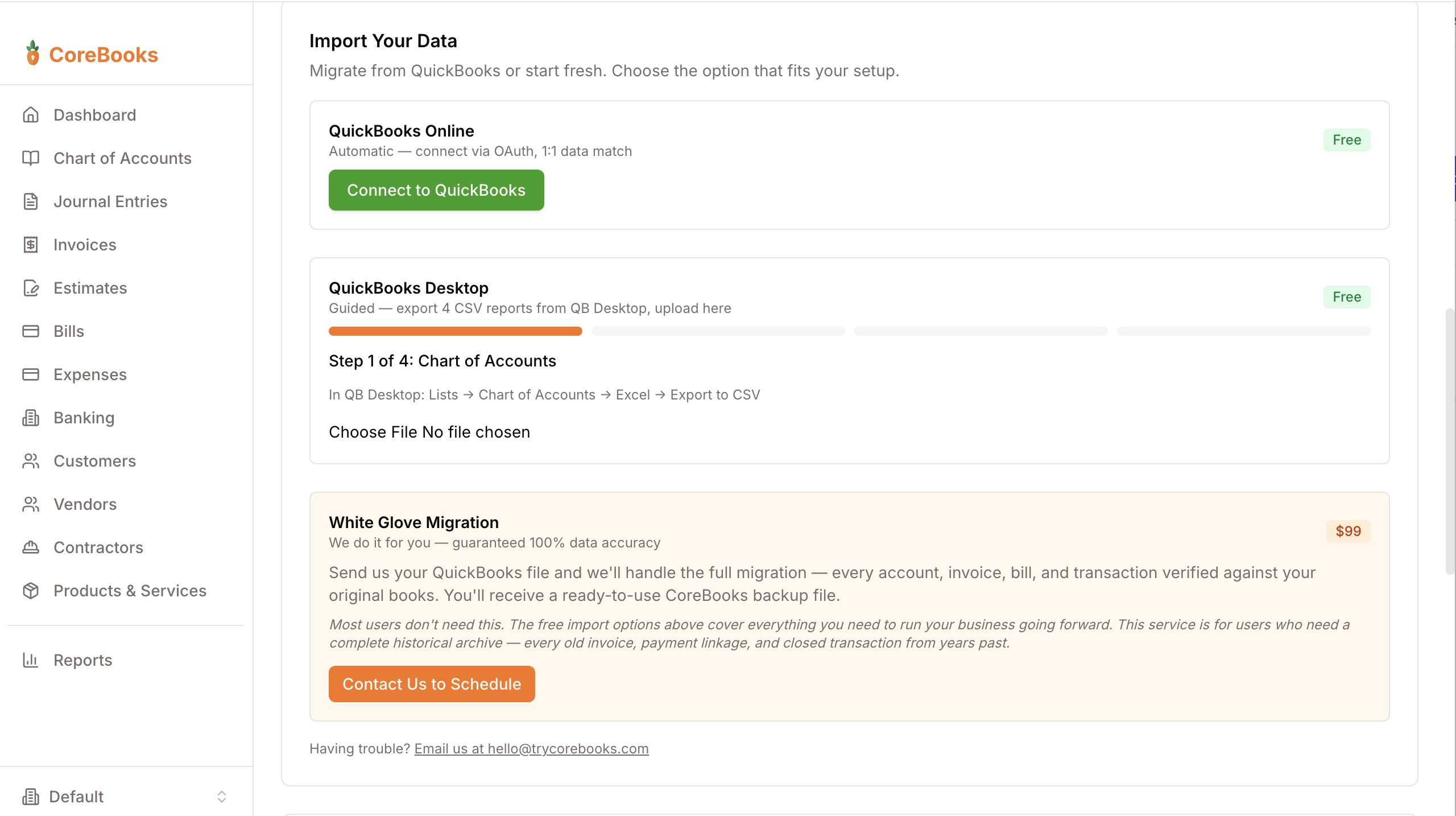
QuickBooks import options
02 — Everything You Need

All the features. None of the bloat.

Invoicing, bills, expenses, bank reconciliation, profit & loss, balance sheet — everything a freelancer or small business needs. No payroll module you'll never use. No enterprise features padded into your tier.

  • Invoicing with Ship To, license #, and PDF export
  • Contracts & proposals with signature lines
  • Bills, expenses, checks, and vendor management
  • Bank accounts, OFX/CSV import, reconciliation
  • P&L, Balance Sheet, AR & AP Aging, General Ledger
  • Multi-company files, LAN multi-user, QuickBooks Online & Desktop import
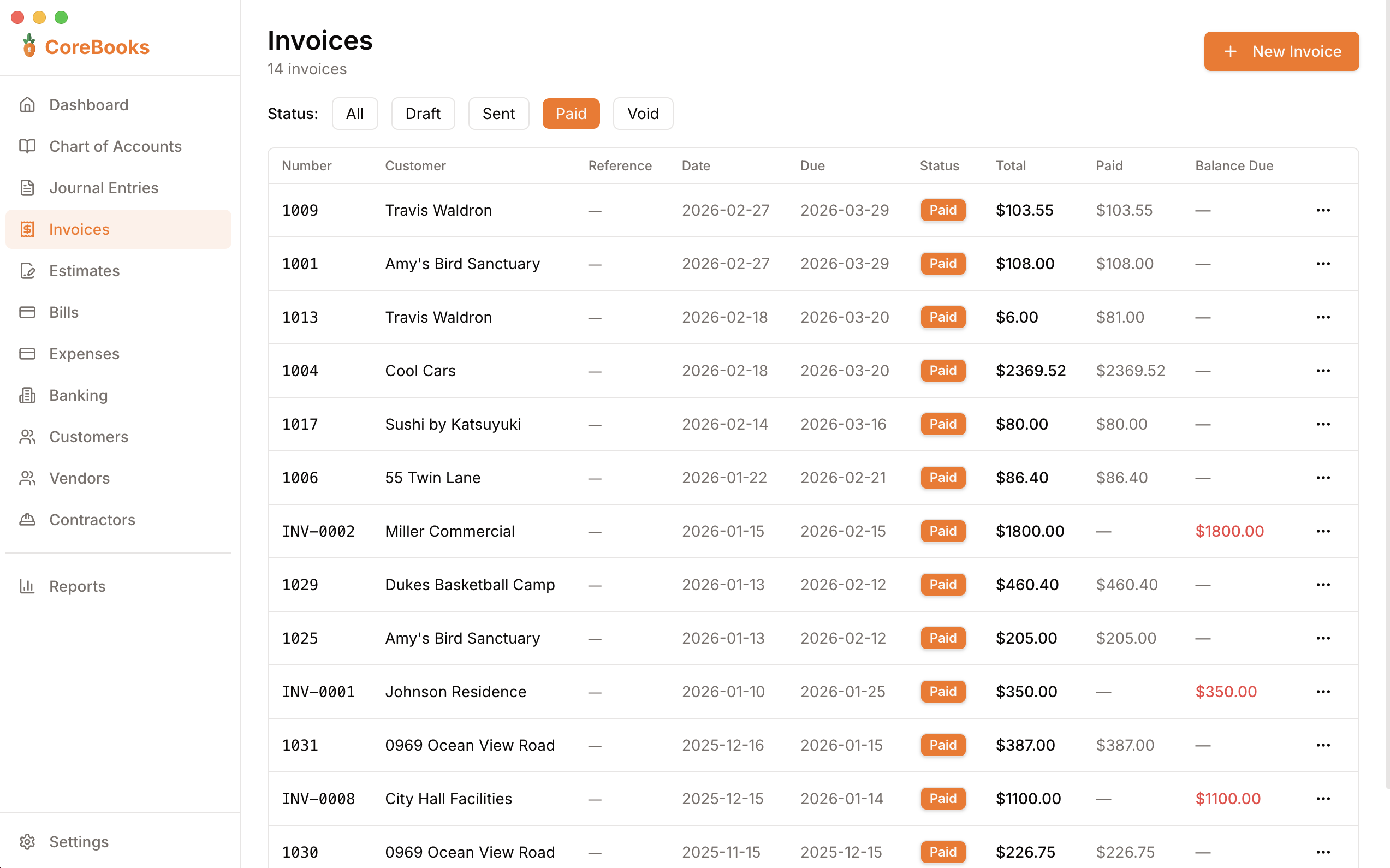
CoreBooks invoicing
03 — Multi-User Mode

Your whole office, one set of books. No cloud required.

Enable LAN access and up to 3 people in your office can use CoreBooks at the same time — from any browser on the network. The host computer runs the app, everyone else opens a URL. No extra installs, no subscriptions, no internet.

  • Up to 3 simultaneous users on your local network
  • Other devices use any browser — no install needed
  • Password-protected access set by the admin
  • Admin can view connected devices and kick users
04 — Data Ownership

Your financial data lives on your computer. Not ours.

Every invoice, every transaction, every report — stored in a single file on your machine. Copy it to a USB drive. Back it up to anywhere. Move it when you switch computers. No one else has access to your numbers.

  • All data stored locally in a single file
  • Auto-backup on every launch — keep last 7 days
  • Manual backup to any location as a .corebooks file
  • Full data export: all CSVs + PDF reports in one ZIP
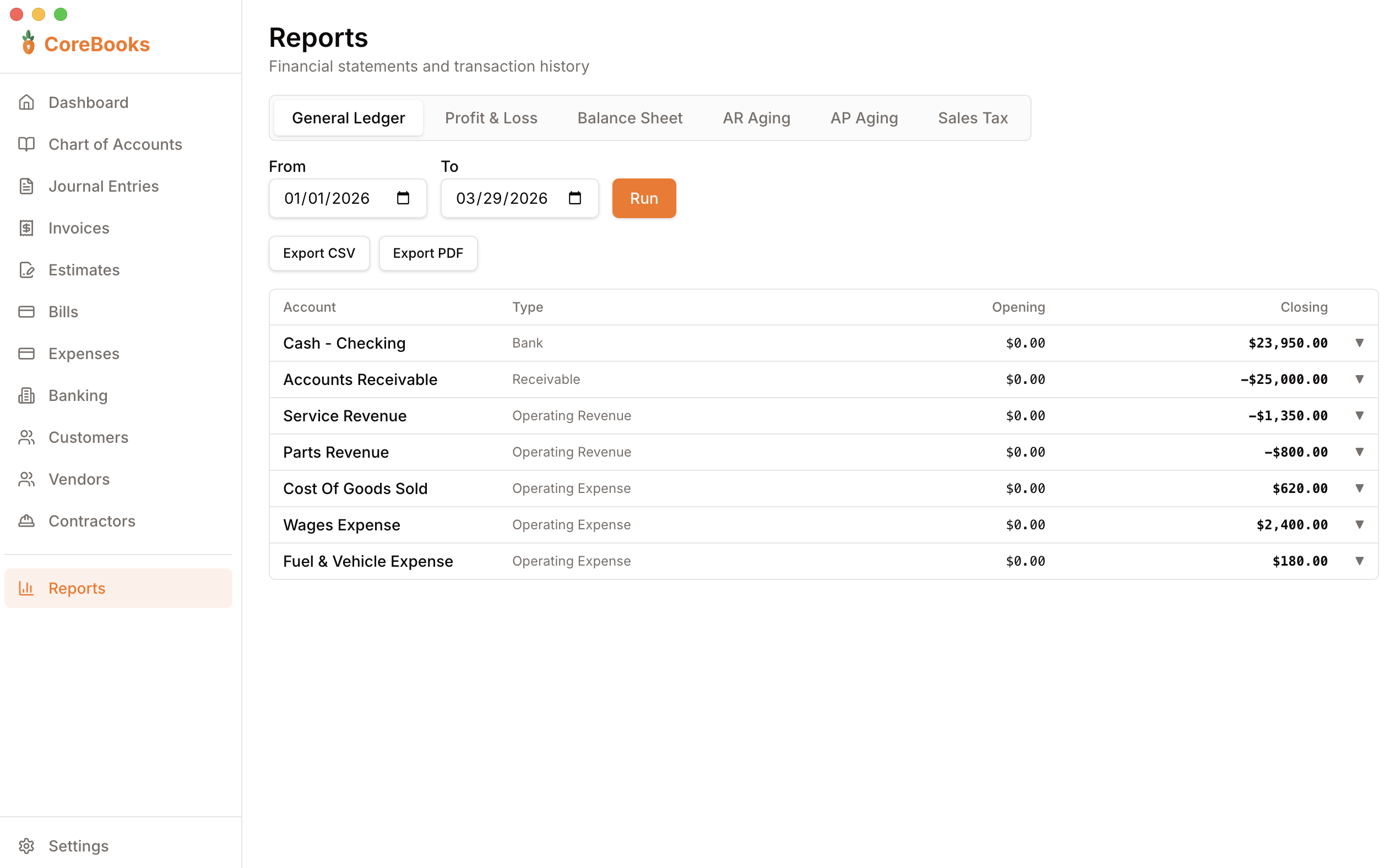
CoreBooks reports
05 — Works Offline

Works in the mountains. Works on the plane. Works when the cloud doesn't.

CoreBooks is a desktop app. It doesn't need an internet connection to open, to invoice a customer, or to pull a report. No "service unavailable" pages. No waiting for the cloud to respond.

  • Runs entirely on your machine — no server required
  • All data stored locally, never transmitted
  • Works in areas with no internet access
  • Auto-updates to keep you on the latest version
No Wi-Fi, No Problem
CoreBooks opened, loaded, and saved your invoice — 36,000 feet up.
CoreBooks running — offline
06 — Real Accounting

Double-entry bookkeeping under the hood. Simple UI on top.

Every transaction posts a proper journal entry automatically. Your books are always balanced. Your accountant gets a real P&L and Balance Sheet at tax time — not a spreadsheet.

  • Chart of Accounts with full sub-account support
  • Proper debit/credit journal entries on every transaction
  • Audit trail — entries voided, never deleted
  • Export any report as PDF or CSV for your accountant
CoreBooks reports
07 — Multi-Company

One app. Every company you manage.

Create as many company files as you need — each with its own books, invoices, customers, and settings. Switch between them from the sidebar in one click. Perfect for bookkeepers managing multiple clients.

  • Unlimited company files from one license
  • Each company has its own database, QuickBooks connection, and backups
  • Switch companies instantly from the sidebar
  • Last-used company opens automatically on launch
🏢
Bookkeeper Ready
Manage 1 company or 20. Switch between clients without closing the app.
Everything included

One price. Every feature.

No tiers, no add-ons, no "upgrade to unlock." Everything CoreBooks has is yours from day one.

Invoicing

Create professional invoices with line items, tax, and notes. Track status from draft to paid. Export as PDF.

Bills & Expenses

Enter bills from vendors, record payments, and track quick expenses with receipt attachments — all stored locally.

Banking & Reconciliation

Import bank statements via OFX, QFX, or CSV. Match transactions to your ledger and mark them reconciled.

Financial Reports

P&L, Balance Sheet, AR & AP Aging, General Ledger — all exportable to PDF and CSV. Give your accountant exactly what they need.

Customers & Vendors

Maintain a full contact list for customers and vendors. Payment history, billing address, outstanding balance — all in one place.

Double-Entry Ledger

Every transaction creates a proper journal entry automatically. Full audit trail — entries are voided, never deleted.

1099 Contractor Tracking

Log contractor payments, flag anyone who hits the $600 IRS threshold, and export a ready-to-file 1099 data report at year-end.

QuickBooks Online & Desktop Import

Import from QuickBooks Online via OAuth or QuickBooks Desktop via guided CSV wizard. Accounts, customers, vendors, invoices, and transactions come with you.

Write Checks

Record check payments from any bank account and print them on standard blank check stock. Check numbers auto-increment and post to your ledger automatically.

Multi-Invoice Payments

Apply a single customer payment across multiple open invoices at once. Partial applies, running balance, and outstanding totals — all handled correctly.

PO & Reference Numbers

Attach a PO number, job number, or contract ID to any invoice, bill, or expense. Unique per record and searchable — no more digging through PDFs to cross-reference.

Estimates & Quotes

Send professional estimates to prospects. Convert accepted quotes to invoices in one click — no re-entering data.

Overdue Invoice Reminders

See at a glance which invoices are past due and by how many days. AR aging keeps you on top of what you're owed.

Sales Tax Tracking

Apply tax rates to invoices and track collected sales tax separately. Export a tax summary at year-end for easy filing.

Backup & Restore

Auto-backup on every launch. Save manual backups as a portable .corebooks file and restore on any machine — schema migrations included.

Multi-Company Files

Manage multiple businesses from one install. Switch between company files instantly — each with its own books, invoices, and settings. Perfect for bookkeepers.

LAN Multi-User Mode

Enable network access and let up to 3 people in your office use CoreBooks simultaneously. No cloud required — other devices connect via browser on your local network.

Contracts & Proposals

Create estimates titled as Contract, Proposal, or Quote. Every document includes a signature line — print it, get it signed on-site. Convert to invoice when accepted.

Ship To & Job Sites

Add a separate "Ship To" address on any invoice — perfect for contractors who bill to an office but do work at a different location.

Professional License #

Add your contractor license, CPA number, or any credential to Settings — it shows automatically on every invoice and estimate PDF. Required by law in many states.

Products & Services

Build a catalog of your products and services with descriptions and default prices. Select items when creating invoices or estimates — no retyping every time.

22
core features included
6
financial reports
7-day
free trial
payment, forever
Pricing

One price. No tricks.

CoreBooks
$249
one-time payment

  • Mac + Windows
  • Free updates for all v1.x releases
  • 7-day free trial — no credit card
  • No subscription, ever
  • Your data stays on your computer
  • Every feature — no tiers

Buy Now — $249
v2 upgrade pricing for existing customers: $49
Questions? Email hello@trycorebooks.com
Download

Get CoreBooks

Download the installer for your platform. Already purchased? Your license key works on both Mac and Windows.

CoreBooks for macOS

Latest version — macOS 12+
Download for Apple Silicon
M1, M2, M3, M4 Macs — .dmg installer
Download for Intel
Intel-based Macs — .dmg installer

CoreBooks for Windows

Latest version — Windows 10/11
Download for Windows
64-bit — .exe installer
Windows SmartScreen warning? CoreBooks is a new app and hasn't yet built up Windows reputation. If you see "Windows protected your PC", click More info then Run anyway to continue. The app is safe — you can verify the download on VirusTotal.
Need a license key? Purchase CoreBooks to get yours.
Already own it? Just download and enter your key on first launch.
FAQ

Common questions

Does it work without internet?
Yes. CoreBooks is a desktop app. After downloading, it never needs an internet connection to open, invoice a customer, or run a report.
Where is my data stored?
On your computer, in your application data folder. It's a standard SQLite file you can copy, back up to Dropbox, or move to a new machine at any time.
What happens when you release updates?
All v1.x updates are free for every customer. When v2 ships, existing customers get upgrade pricing ($49 vs $249). You'll never be forced to upgrade.
Can I import from QuickBooks Online or Desktop?
Yes — both. QuickBooks Online imports automatically via one-click OAuth. QuickBooks Desktop uses a guided 4-step CSV wizard. Both bring over your accounts, customers, vendors, invoices, bills, and transactions. We also offer a paid white glove migration service if you want us to handle it for you.
What does "beta" mean for me as a customer?
CoreBooks is feature-complete and used for real bookkeeping today, but we call it beta until v1.0 ships because rough edges still surface. Concretely that means: your data is safe (it's a local SQLite file you can back up anywhere), every update through v1.0 is free, and bug reports go straight to a human and usually get a same-day reply. Try it free for 7 days before buying. Early customers also lock in $249 — the price goes up at v1.0.
Is it really one-time? No hidden fees?
Really. $249 once. No monthly fee, no annual renewal, no "your plan has expired" emails. You own the software.
What if I don't like it?
Try it free for 7 days — no credit card, no commitment. If you buy and it's not the right fit, email hello@trycorebooks.com and we'll work it out.
Does it work on Mac and Windows?
Yes. CoreBooks runs on macOS 12+ and Windows 10/11. Both platforms get the same installer and the same features.
Can multiple people use CoreBooks at the same time?
Yes. Enable LAN Multi-User Mode in Settings and up to 3 people in your office can access CoreBooks from any browser on the same network. No cloud, no extra installs. The admin sets a shared password and can manage connected devices.
Can I manage multiple businesses with one license?
Yes. Create as many company files as you need — each with its own books, invoices, and settings. Switch between them from the sidebar. One license covers all your companies.
What does my accountant get at tax time?
Export your P&L, Balance Sheet, General Ledger, or any report as a PDF or CSV and send it directly. No accountant login required. CoreBooks also generates a 1099 contractor report for year-end filing.

Stop renting your
accounting software.

Buy once. Keep forever.

Try Free for 7 Days
No credit card required  ·  Mac + Windows